3D Illustrated Periodic Table Model Assembly
Replacement for the
Printed Assembly Notes of the model kit
Double Reverse Loop Twist of the 'Hydrogen Crown'
CLICK ON PHOTO
TO ENLARGE

1. Free up the Hydrogen 'Crown"
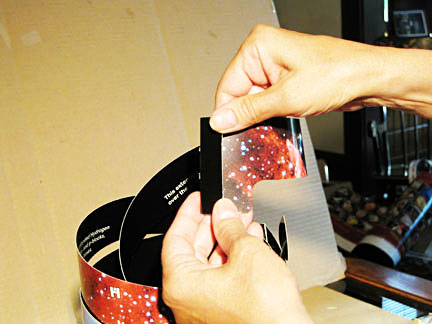
2. Fold the 'boot' at the free end of strip
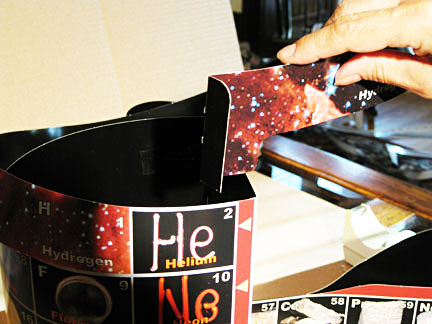
3. Loop to bring 'boot' over Helium
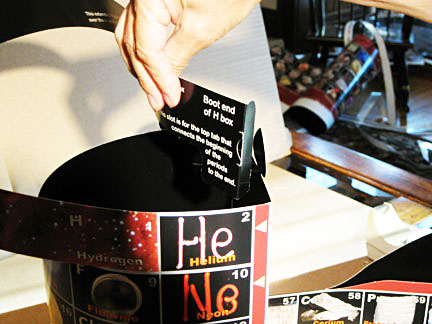
4. Twist to get behind Helium data box
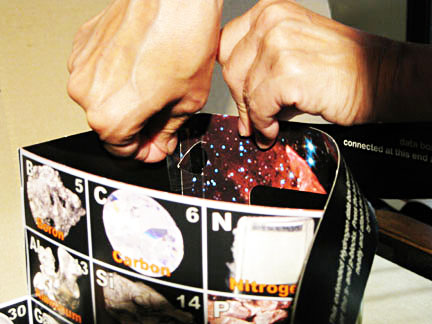
5. Push slot around top tab right there
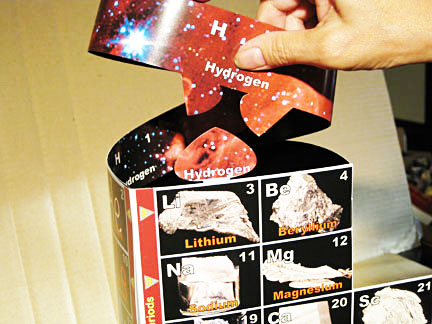
6.Trap Li 'spade' with H above
1. Remove paperclip and loosen the extended Hydrogen strip.
2. Fold the free boot-like end flap at the crease - stars to stars.
3. Loop that end of the strip clockwise once until over He.
4. While placing into the corner behind He, twist the end the other way so the fold fits behind the He/Li corner, and slide the slot all the way around the joiner tab there.
5. Align the top edges and tape both tab and slot flap (while kept pressed together to the back of He) behind Li.
Some H strip is now doubled - leave naturally looped, pressed together, and top edges matching.
6. Press loop middle with side grabbers around Li spade shape over Li & Be and tape black to black inside.
Align the top edges and tape bottom of strip to the back of the right side of the Fluorine box.
NEXT - Finish the Coronation ->>
Any problems? Call the AAE HELPLINE at 773.271.0318 days
...or
email me at Roy@AlexanderArrangementofElements.com.
< BACK