3D Illustrated Periodic Table Model Assembly
Replacement for the
Printed Assembly Notes of the model kit
ATTACH the 'Hydrogen Crown'
CLICK ON PHOTO
TO ENLARGE
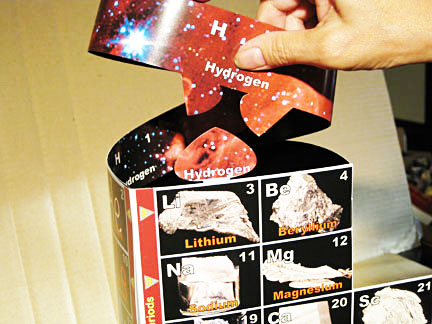
1. Position H strip over Lithium
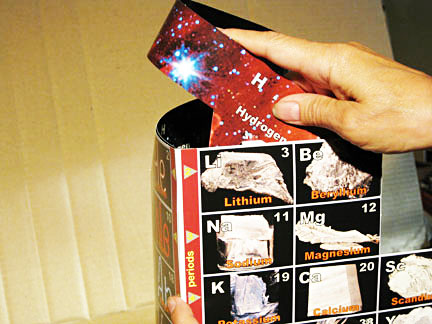
2. Rock down to position for sides to grab
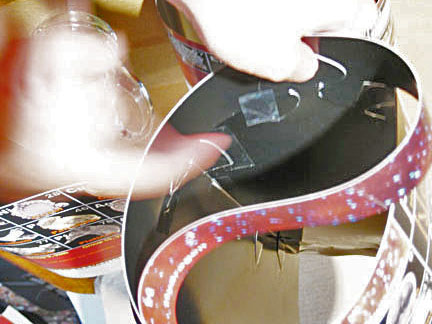
3. Put tape on spade, align, then press
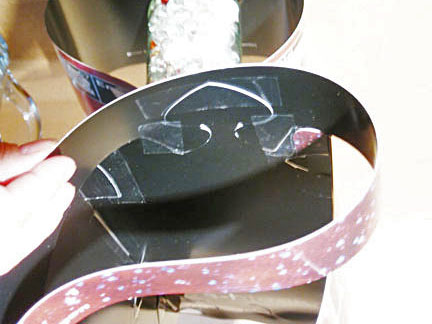
4. Tape curved tabs behind Li and Be
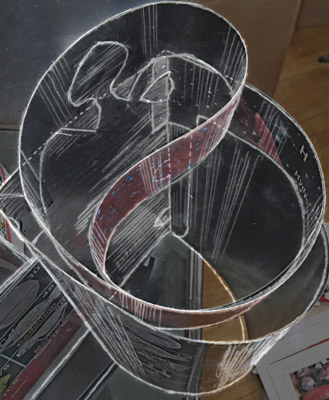
5. Final interior detail of Hydrogen Crown
1. Bring outside of loop clockwise so the pair of half rounded tabs on the bottom edge are at the spade shape over Li.
2. Press and rock tabs for strip to go in front of the spade and below and behind the top edge of the element box on each side of the spade.
Lay the assembly down between your knees, top toward you. (Observe final assembly in #6 photo/sketch below.)
3. Apply tape neatly to the upper half of the spade, extending on both sides, but not in contact with the strip, then hold the H strip flush and even to top of Li box - left and right - and press the spade tape to the strip on both sides.
4. Check if strip bottom is flush with box top edges on both sides. Tape the straight edges of the curved tabs to the rear of Li and Be.
5. Check to assure all parts are in necessary positions, and if necessary, correct by removing tape or cutting at edges and apply new tape.
NEXT - Hydrogen's
Connection with Carbon ->>
Any problems? Call the AAE HELPLINE at 773.271.0318 days
...or
email me at Roy@AlexanderArrangementofElements.com.
< BACK